Craft CMS の編集中データを GraphQL で取得する方法をこの前調べた。
Gatsby v4 で SSR ができると言うことなので、編集中の内容を取り出すところを試してみた。
Rendering Options | Gatsby
https://v4.gatsbyjs.com/docs/c…
以下の方法は認証とか甘いので、あくまで参考程度に。
v4 の Beta Starter のうち gatsby-starter-rendering-modes を触ってみる。
Gatsby v4 Beta Starters | Gatsby
https://v4.gatsbyjs.com/gatsby…
.env の設定
ひとまず .env.production ファイルを用意して、エンドポイント、Token を指定しておく。
途中までの開発は gatsby develop でもいいのだけど最終的には gatsby build して gatsby serve する感じになる。
Server-Side Rendering API | Gatsby
https://v4.gatsbyjs.com/docs/r…
CraftGQLURL=http://example.com/api
CraftToken=hogehoge
gatsby-config.js に .env 周りを追記しておく。
require("dotenv").config({
  path: `.env.${process.env.NODE_ENV}`,
})
module.exports = {
}
編集中のデータをSSRでみる
編集中のデータをSSRで確認してみる。認証とか取得方法がざるなので実際に使う際には tokenとかちゃんとする必要がある。
src/pages/preview.js
import * as React from 'react'
import fetch from 'node-fetch'
import { Link } from 'gatsby'

export default function SSR (props) {
  const { entry } = props.serverData

  if(entry) {
    return (
      <>
        <Link to='/'>Home</Link><br />
        <h1>SSR: Server Side Rendering</h1>
        <div>
          <h2>{entry.title}</h2>
          <p>{entry.postDate}</p>
          <p>id : {entry.id}</p>
          <p>uid : {entry.uid}</p>
          <p>sourceUid : {entry.sourceUid}</p>
          <p>canonicalUid : {entry.canonicalUid}</p>
        </div>
      </>
    )
  }else{
    return (
      <>
        <Link to='/'>Home</Link><br />
        <h1>SSR: Server Side Rendering</h1>
        <div>
          <p>該当無し</p>
        </div>
      </>
    )
  }
}

export async function getServerData (context) {
  const uid = context.query.uid

  if (!context.query.token || !context.query.uid) {
    // invalid な対応
  }

  const data = await fetch(process.env.CraftGQLURL , {
    method: 'POST',
    headers: {
      'Content-Type': 'application/json',
      'Authorization': `Bearer ${process.env.CraftToken}`
    },
    body: JSON.stringify({
      query: `
        query($uid: [String])  {
          entry(uid:$uid,status: null, drafts: null,provisionalDrafts: null){
            title
            postDate
            id
            uid
            sourceUid
            canonicalUid
          }
        }
        `,
      variables: {
        uid: uid
      }
    }),
  })
    .then(res => res.json())

  if (!data) {
    // 404 な対応
  }

  return {
    props: {
      entry: data.data.entry
    }
  }
}
編集画面からのライブプレビューなどが http://localhost:9000/preview?uid={uid} こんな感じのURL( +tokenなど)で飛んでくる想定で。
getServerData の context でクエリパラメータとかとれるので uid を取り出す。
fetch で Craft CMS の GraphQL をたたいてデータを取得する。
uid を variables で渡しつつ、先日の
entry(uid:$uid,status: null, drafts: null,provisionalDrafts: null){で該当のデータを取り出す。
取り出したデータを props.serverData で受け取ってページを組み立てる。
uid が一致しなかったり、token周りとかない場合などを考えて一応 entry で分岐入れておく。
入れておかないと起動した gatsby serve が止まるので。
準備できたら gatsby build して、 gatsby serve をする。
こんな感じで、Craft CMS で編集したライブプレビューの内容を確認できる。
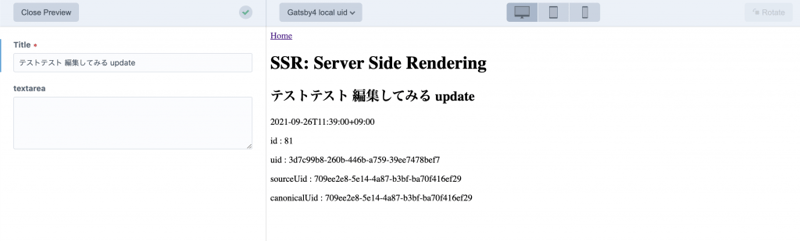
まだベータだし、作りも雑すぎるのであれだけどいいかんじ。