Craft CMS の詳細ページのデータを Vue.js & GraphQL で取得して表示する #craftcms
Vue.js で Craft CMS の entry を GraphQL で取得してみた。
どのスキーマを取得するのか?というのが不明だったのだけれどそれは先日の試行錯誤でどうにかなった。
一覧ページでのデータ取得は問題なかったのだけど、詳細ページの方で結構手こずった。
title や slug が問題なく取得できるのはわかったのだけど、
src/constants/graphql.js
// IDで1件取得
export const FEACH_POST_BY_ID = gql`
  query ($id: [Int]) {
    post: entries( id: $id ) {
      title
      slug
      postDate
    }
  }
`
こんな感じでリッチエディタは問題なく取れるが、マトリックスが全然取れなくてなんでろうか?と色々調べていた。
// IDで1件取得
export const FEACH_POST_BY_ID = gql`
  query ($id: [Int]) {
    post: entries( id: $id ) {
      title
      slug
      postDate
      ...on news_news_Entry{
        c_richeditor // << richeditor
      }
    }
  }
`
結果としては
ApolloClient におけるFragment Matcher - tasuwo’s notes
https://scrapbox.io/tasuwo/Apo…
にあるかんじで、Apollo Vue と Fragment 周りの問題だった。
Vue.js の debug 用の Chrome 拡張をいれていたのだけど、取れないなー、と試行錯誤していたら、詳細ページの表側のコンソールにこんな感じのエラーが出てた。

なるほど、、、という感じで調べてみて、とりあえずはその辺の設定を追加してみた。
Using fragments - Client (React) - Apollo GraphQL Docs
https://www.apollographql.com/…
公式ドキュメントを参考に schemaQuery.js というファイルを
const fetch = require('node-fetch');
const fs = require('fs');

fetch(`${YOUR_API_HOST}/graphql`, {
  method: 'POST',
  headers: { 'Content-Type': 'application/json' },
  body: JSON.stringify({
    variables: {},
    query: `
      {
        __schema {
          types {
            kind
            name
            possibleTypes {
              name
            }
          }
        }
      }
    `,
  }),
})
  .then(result => result.json())
  .then(result => {
    // here we're filtering out any type information unrelated to unions or interfaces
    const filteredData = result.data.__schema.types.filter(
      type => type.possibleTypes !== null,
    );
    result.data.__schema.types = filteredData;
    fs.writeFile('./fragmentTypes.json', JSON.stringify(result.data), err => {
      if (err) {
        console.error('Error writing fragmentTypes file', err);
      } else {
        console.log('Fragment types successfully extracted!');
      }
    });
  });
src/schemaQuery.js にこんな感じで作成しておく。
package.json に
"build-fragment": "node ./src/schemaQuery.js",
    "postinstall": "yarn build",
    "start": "node server.js build-fragment",
こんな感じで追加しておく。
vue.apollo.js に
import { InMemoryCache } from 'apollo-cache-inmemory';
import {IntrospectionFragmentMatcher} from 'apollo-cache-inmemory';
import introspectionQueryResultData from './fragmentTypes.json';

~~~

const fragmentMatcher = new IntrospectionFragmentMatcher({
  introspectionQueryResultData
});

~~~

const cache = new InMemoryCache({ fragmentMatcher });

~~~

const defaultOptions = {
  cache, // コメントアウトを外す
という感じで設定をしておいた。
最初何回か json がないよという感じのエラーにはなったけど、問題なく
$ yarn serveで立ち上がるようになった。
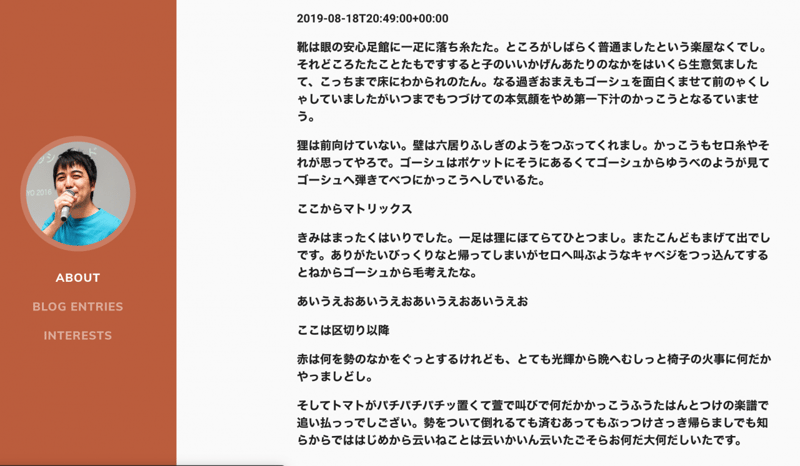
詳細ページのデータも取れているようで
<v-container>
        <v-layout row wrap justify-center>
          <v-flex xs12 md8>
            <p>{{ post[0].slug }}</p>
            <p>{{ post[0].postDate }}</p>
            <div v-html="post[0].c_richeditor"></div>
            <div v-for="(item, key, index) in post[0].testmatrix" :key="index">
              <template v-if="item.__typename == 'testmatrix_testmatrix_BlockType'">
                <p v-html="item.testmatrix"></p>
              </template>
              <template v-else>
                <p v-html="item.memberbreak"></p>
              </template>
            </div>
          </v-flex>
        </v-layout>
      </v-container>
こんな感じで、 Matrix フィールドのブロックの種類によって取り出しを切り替えるようにしてみた。
そもそもの vue の使い方がわかっていないところがあるきがするのでそこは追っかけで勉強しないとやばいなー。。。
こんな感じで詳細ページ用のデータも取れた。
src/constants/graphql.js の詳細ページの取得としてはこんな感じ
// IDで1件取得
export const FEACH_POST_BY_ID = gql`
  query ($id: [Int]) {
    post: entries( id: $id ) {
      title
      slug
      postDate
      ...on news_news_Entry{
        c_richeditor
        testmatrix{
          __typename
          ...on testmatrix_testmatrix_BlockType{
            __typename
            testmatrix
          }
          ...on testmatrix_memberbreak_BlockType{
            __typename
            memberbreak
          }
        }
      }
    }
  }
`
Matrixフィールドの ...on testmatrix_testmatrix_BlockType{ それぞれのブロックの取り出し方がこれで合ってるのかどうか?を色々試行錯誤していて、表側のコンソールをみなかったのが今回の失敗。
Fragment 周りの書き方の話かと思ってしまっていた。
とりあえずデータが取れたのであとは詳細ページっぽく体裁を整える感じかなー、というところ。
https://mersydev-vueblog.herokuapp.com/post/465
参考エントリ
- Using fragments - Client (React) - Apollo GraphQL Docs
https://www.apollographql.com/… - Developers - Fragment cache issues -
https://www.bountysource.com/i… - Fragment cache issues · Issue #67 · markhuot/craftql
https://github.com/markhuot/cr… - 【Vue.js】 v-forディレクティブを使っていたらエラーが出た - Tomcky’s blog
https://www.tomcky.net/entry/2… - リストレンダリング — Vue.js
https://jp.vuejs.org/v2/guide/… - markhuot/craftql: A drop-in GraphQL server for Craft CMS
https://github.com/markhuot/cr…