VuePress で作成したページを GitHub Actions で GitHub Pages にデプロイしてカスタムドメインを適用する
VuePress でページを生成して、 GitHub Actions でビルドして GitHub Pagesで公開するというのを試してみた。
Deployment | VuePress
https://vuepress.github.io/gui…
ここにあるとおりにやれば基本OKで、その後にカスタムドメインを割り振ってみたところ、 Push すると GitHub Pages のカスタムドメインの設定が飛んでしまってどういうことだろうな、、、と調べてみた。
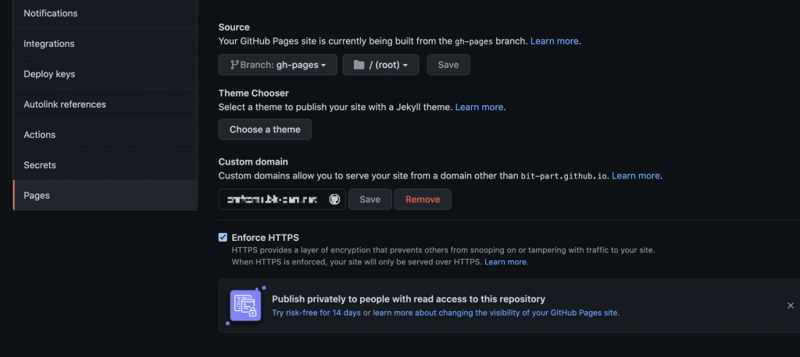
GitHub Actions の書き方にもよるところがあるんだろうけど、 cname を書けば良いと言うのもあったりしたので、リポジトリの説明を見てみる。
crazy-max/ghaction-github-pages: GitHub Action to deploy to GitHub Pages
https://github.com/crazy-max/g…
これを見る限りは、 fqdn を指定すれば良さそうなので、
- name: Deploy to GitHub Pages
        uses: crazy-max/ghaction-github-pages@v2
        with:
          # deploy to gh-pages branch
          target_branch: gh-pages
          # deploy the default output dir of VuePress
          build_dir: docs/.vuepress/dist
          fqdn: sample.example.com << 追加
みたいなかんじで指定したら Push しても問題無く更新されて、サブドメインでも表示された。
config.js の base の指定は
If you are deploying to https://
.github.io/ /, for example your repository is at https://github.com/<;USERNAME>/ , then set base to ”/ /”.
ということで、
module.exports = {
   base: '/<REPO>/',
}
にしておいたのだけど、カスタムサブドメインにするとパスがずれるので、 `/` に変更しておいた。
ドキュメントは読みましょう。
GitHub Actions もっと調べてみよう。