Craft CMS のデフォルトだと HTTP header の Cache control まわりが
Cache-Control:no-store, no-cache, must-revalidate,のような感じになってる
Why does Craft set no-cache headers for all requests? - Craft CMS Stack Exchange
https://craftcms.stackexchange…
まぁ、通常はこれでもいいのかも?しれないけどこの辺の設定ができるのが header タグ
{% header %}{% header %} Tags | Craft 3 Documentation
https://docs.craftcms.com/v3/d…
だったり、 Upper プラグインだったりする。
CDN 使うときとかに origin 側の cache control を参照したりすることもありそうなので、その辺を見てみた。
ドキュメントサイトにあるような感じで設定をしてみる。
例えば _layout.twig に追記する。
{# Tell the browser to cache this page for 30 days #}
{% set expiry = now|date_modify('+30 days') %}

{% header "Cache-Control: max-age=" ~ (expiry.timestamp - now.timestamp) %}
{% header "Pragma: cache" %}
{% header "Expires: " ~ expiry|date('D, d M Y H:i:s', 'GMT') ~ " GMT" %}
これを追記することでこのようなかんじになる。
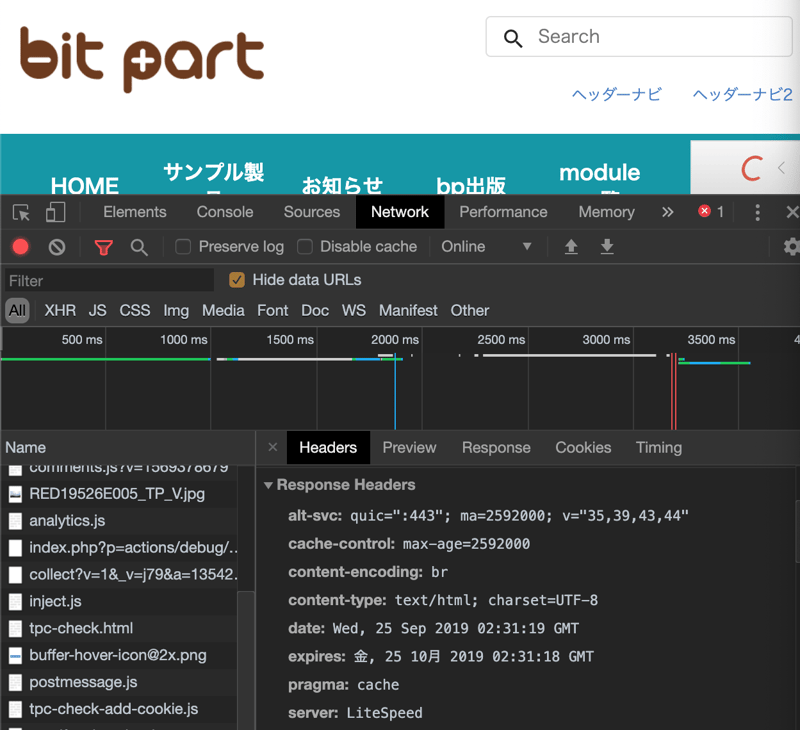
upper プラグインだけでなくキャッシュ周りの blitz プラグインや html cache プラグインとの兼ね合いも見てみたほうがいいのかもしれない。
Blitz
https://plugins.craftcms.com/b…
HTML Cache
https://plugins.craftcms.com/h…